The Homelab
Two mini PCs, an old laptop, a TrueNAS box, a MikroTik router, nearly 80 containers and VMs, and a growing list of things I probably didn't need to self-host
The server room, right now
78 things running across three nodes, as of October 18, 2026. Everything below is a real container or VM.
homelab01
Dell OptiPlex Micro (the workhorse)
i5-10500T · 12 threads · 64 GB · 2 TB NVMe
43 running
- Ari
- Ari's memory graph
- Ari Computer
- Immich
- Jellyfin
- Tdarr
- Home Assistant
- Forgejo
- GitHub runner
- Kaneo
- SiYuan
- OpenCloud
- PocketID
- CouchDB
- Grafana
- Bazarr
- Lidarr
- SoulSync
- Wizarr
- Listmonk
- TackleTag
- OpenClaw
- llama.cpp
- Firecrawl
- +19 more
homelab02
Dell OptiPlex 3050 Micro (the small stuff)
i5-7500T · 4 cores · 20 GB · one laptop HDD
25 running
- Pi-hole
- Prometheus
- Healthchecks
- Blackbox Exporter
- Homepage
- NPM Plus
- Sonarr
- Radarr
- Prowlarr
- Recyclarr
- FlareSolverr
- Deluge
- Lidarr
- slskd
- Koel
- SearXNG
- Remark42
- saulutions.ca
- Postiz
- +6 more
homelab03
HP Pavilion laptop (the tie-breaker)
i7-7500U · 4 threads · 20 GB · 1 TB HDD · GeForce 940MX
10 running
- Jellyseerr
- Navidrome
- BookLore
- Shelfmark
- Paperless-ngx
- Tandoor
- embeddings
- +3 more
truenas
TerraMaster F4-423
TrueNAS SCALE · 20 TB WD Red Pro + 12 TB IronWolf
- vault: mirrored, 10.9 TB, 3.9 TB used
- media: 7.3 TB, 1.4 TB used
- Immich, files, Time Machine, backups
terastation
Buffalo TeraStation
Debian · 4x 2 TB WD Red · RAID10
- retired NAS, now the backup
- gets a copy of the vault every month
mikrotik
MikroTik hAP ax³
RouterOS 7.20
- 5 VLANs + management
- firewall, DNS forwarding
- WireGuard break-glass
A few years ago, “home server” meant an old laptop running Plex. Now I’ve got three Proxmox nodes (one of them is, fittingly, an old laptop), a TrueNAS box, nearly 80 containers and VMs, a MikroTik router handling VLAN segmentation, and enough self-hosted services that I actually need documentation to keep track of it all.
Updated October 2026. The first version of this page was from February, back when it was two nodes and 35 containers. A lot happened in between, there’s a section on that further down.
This is how it’s all put together, the hardware, the network architecture, and why I made the choices I did.
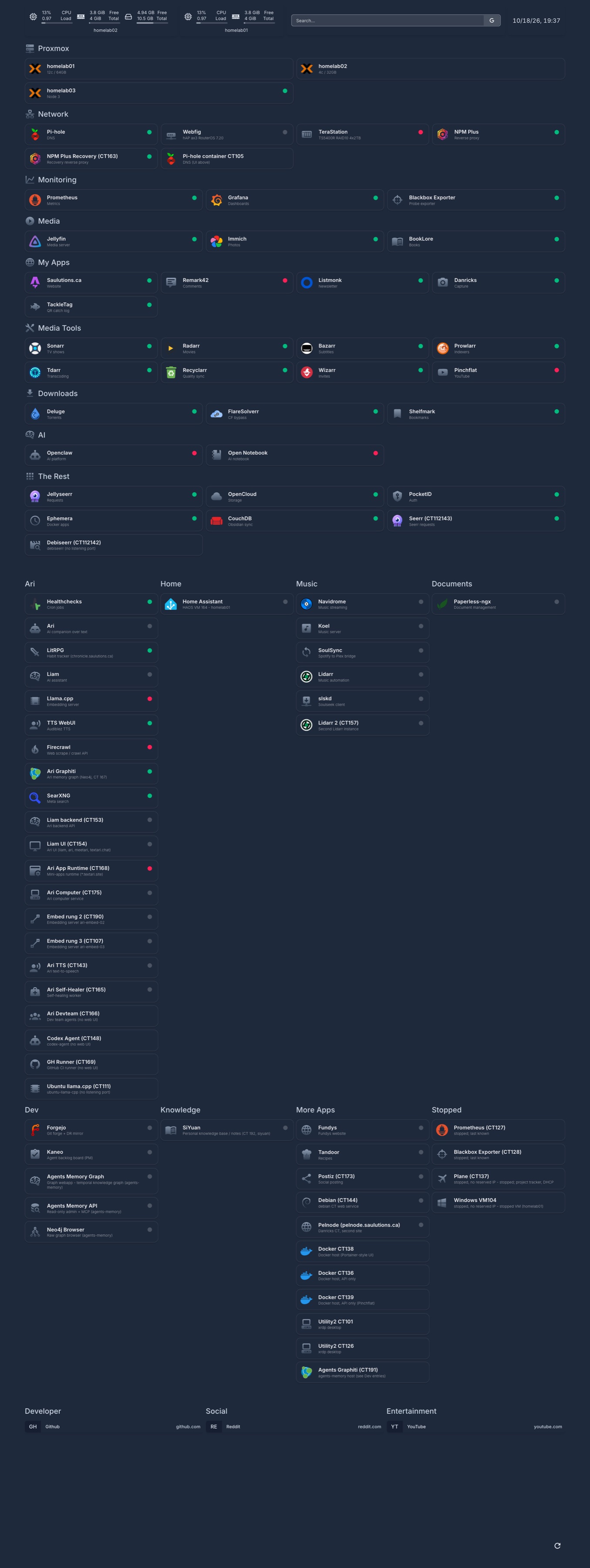
The top of my Homepage dashboard, October 2026. Here’s the whole thing, it scrolls for a while now. Internal addresses are scrubbed out and a few personal tiles are hidden.
The hardware
Nothing fancy here. No enterprise gear, no rack-mounted servers.
| Machine | Specs | Role |
|---|---|---|
| homelab01 | Dell OptiPlex Micro, i5-10500T, 12 threads, 64GB RAM, 2TB NVMe | The workhorse. Ari plus Ari’s databases, Immich, Jellyfin, the embedding models, CI runners |
| homelab02 | Dell OptiPlex 3050 Micro, i5-7500T, 4 cores, 20GB RAM, one 2.5” laptop hard drive | The small stuff: Pi-hole, monitoring, the *arr apps. That single laptop hard drive is the slowest thing in the building, and in October I moved eight of the busiest containers off it |
| homelab03 | HP Pavilion laptop, i7-7500U, 20GB RAM, 1TB HDD, GeForce 940MX | Joined in July. The third vote the cluster needed, and because it’s a laptop, its battery rides out power cuts that take the other two down |
| NAS | TerraMaster F4-423 running TrueNAS SCALE, 20TB WD Red Pro + 12TB Seagate IronWolf | New in October. A mirrored vault pool for anything irreplaceable (photos, files, Mac backups) and a media pool for things I could download again |
| Offsite-ish backup | Buffalo TeraStation, 4x 2TB WD Red, RAID10 | The old NAS. Re-imaged with Debian and demoted to a backup target that the TrueNAS syncs to |
| Router | MikroTik hAP ax³ | All the routing, VLANs, firewall rules, and a break-glass VPN |
Two OptiPlexes and a laptop. Still no enterprise gear, still no rack. I haven’t re-measured the power draw since the third node showed up, which is probably for the best.
Why Proxmox
I could’ve just installed Docker on a Linux box and called it a day. But Proxmox gives me a few things Docker alone doesn’t.
Snapshots and backups. Before I touch a container, I snapshot it. If something breaks, I roll back. This has saved me more times than I’d like to admit.
LXC containers. Lighter than VMs but more isolated than Docker containers. Each service gets its own IP, its own filesystem, and if one goes down the others don’t care.
Cluster management. Three nodes, one cluster. I can move containers between them when one machine needs maintenance. Two nodes was a mistake I learned the hard way: lose one and the other can’t make decisions on its own (more on that below). The laptop exists mostly to be the tie-breaker.
Resource limits. Each container has hard limits on CPU and RAM. Jellyfin can’t eat all the memory just because it decided to transcode four streams at once.
Network architecture
This is where things get interesting. Everything runs through the MikroTik, and I’ve segmented the network into VLANs:
| VLAN | Name | Subnet | How it connects | What can it reach |
|---|---|---|---|---|
| 10 | Home | 10.129.10.0/24 | NachoWifiPremium (5 GHz) + NachoWifiBasic (2.4 GHz) | Everything, this is my trusted network |
| 20 | Homelab | 10.129.20.0/24 | Ethernet (both Proxmox nodes wired) | Each other, select IoT containers, and the internet |
| 30 | IoT | 10.129.30.0/24 | NachoSmart (5 GHz + 2.4 GHz) | Internet and each other. Home Assistant reaches them, not the other way around |
| 40 | Guest | 10.129.40.0/24 | NachoVIP (5 GHz + 2.4 GHz) | Internet. Period. |
| 50 | DMZ | 10.129.50.0/24 | Ethernet (NPM Plus only) | Specific backend services on Homelab, only the ports they actually use |
| (untagged) | Management | 10.129.88.0/24 | Ethernet | Network management interfaces |
All the Wi-Fi networks use 802.11r fast transition so devices roam smoothly. Yes, I named my guest network “NachoVIP.” No regrets.

Why bother?
Security. My IoT devices, smart plugs, cameras, whatever, are on their own network. They can reach the internet and each other, but they can’t reach my laptop or my Proxmox servers. Home Assistant reaches them, not the other way around. If some cheap smart plug gets compromised, an attacker hits a wall.
Isolation. Guest Wi-Fi gets internet access and nothing else. Friends can browse the web but they can’t accidentally (or intentionally) access my internal services.
Organization. When everything has its own subnet, troubleshooting is easier. If something on 10.129.30.x is misbehaving, I know it’s an IoT device without even looking.
The MikroTik handles all of this with a few dozen firewall forward rules, plus FastTrack for established connections so the hardware offloads most of the packet processing. The router’s own management only answers to a short admin allowlist, and every homelab device has a static ARP entry to prevent spoofing.
DNS flow
Every VLAN queries the MikroTik gateway as its DNS server, and the MikroTik forwards everything to Pi-hole running on the Homelab VLAN. Pi-hole blocks ads and trackers network-wide, about 402,000 queries processed with nearly 3,000 blocked on any given day. The DMZ and management VLANs bypass Pi-hole and use Cloudflare’s 1.1.1.1 directly, so a Pi-hole outage doesn’t break the reverse proxy or management access.

How traffic reaches my services
External DNS goes through Cloudflare, all my public domains are proxied, so the actual server IP is hidden. Cloudflare forwards traffic to my MikroTik router, which port-forwards 80/443 to NPM Plus in the DMZ. From there:

NPM Plus (Nginx Proxy Manager Plus) is the only thing directly exposed to the internet. The firewall only lets it reach the specific IPs and ports it actually proxies, and nothing else. So even if NPM gets compromised, an attacker can’t just scan my network, they can only hit the services I’ve explicitly allowed. There’s also a standby copy of NPM that syncs its config automatically, so the proxy isn’t a single point of failure anymore.
Each public domain gets its own SSL cert from Let’s Encrypt, and NPM handles the renewal automatically. All I do is add a new proxy host, request a cert, and enable “Force HTTPS.”
Right now about 30 sites are public: photos.saulutions.ca for Immich, movies.saulutions.ca for Jellyfin, library.saulutions.ca for books, auth.saulutions.ca for PocketID, Ari, this website, and a bunch more. Each one is a container on the Homelab VLAN, proxied through NPM.
Remote access with Tailscale (and a break-glass door)
When I’m away from home, I use Tailscale to reach my internal services as if I was on my local network. A subnet router advertises the Home, Homelab and Management networks, and since July every Proxmox node runs Tailscale directly too, so I can still reach a node even if the container that does the routing is down.
For the really bad days there’s a WireGuard tunnel that ends on the MikroTik itself. It works even when all three nodes are off, which is exactly the situation where I’d need it most.
What’s running
Deep breath.
| Category | Services | Why |
|---|---|---|
| Media | Jellyfin, Jellyseerr, Sonarr, Radarr, Bazarr, Prowlarr, FlareSolverr, Recyclarr, Deluge, Tdarr, Wizarr, Pinchflat | This is the reason the homelab exists. My own Netflix that nobody can cancel on me |
| Music | Navidrome, Koel, Lidarr, slskd, SoulSync | New since spring. My own Spotify, with friends logging in through the same single sign-on as everything else |
| Photos and files | Immich, OpenCloud, BookLore, Shelfmark, Paperless-ngx, CouchDB (Obsidian sync) | Google Photos replacement, file sync, ebooks, scanned paperwork. I’m also a contributor to Shelfmark, I added multi-user support and OIDC authentication |
| AI | Ari and everything Ari runs on: Postgres, a Neo4j memory graph, llama.cpp embeddings, self-hosted SearXNG and Firecrawl for web search, voice, and a macOS VM that bridges iMessage | Ari is the AI that texts you first, and the whole thing runs here. These days it’s the main AI project; the OpenClaw setup from the series is still around |
| Smart home | Home Assistant | What actually started all of this, and the reason the IoT network exists in the first place. It runs Home Assistant OS in its own VM now |
| Notes and planning | SiYuan, Kaneo, Open Notebook | A personal knowledge base and a project board, both self-hosted, obviously |
| Dev and CI | Three GitHub Actions runners, Forgejo | When the free GitHub Actions minutes ran out in July, CI moved home. Forgejo keeps a mirror of every repo in case GitHub ever goes away |
| Infrastructure | Pi-hole, NPM Plus, Homepage, PocketID, oauth2-proxy, Tailscale | DNS blocking, reverse proxy, dashboard, SSO, and remote access |
| Monitoring | Prometheus, Grafana, Blackbox Exporter, Alertmanager, Healthchecks | I get emails when things break, dashboards to see what’s happening, and alerts if cron jobs don’t phone home |
| Other | Remark42, Listmonk, TackleTag, a Minecraft server, and a couple of websites for friends | Blog comments, the newsletter, a fishing catch log I built in a day, and yes, still the Minecraft server |
That’s 77 containers and 5 VMs across three nodes, 78 of them running as I write this. Most are LXC containers running services directly, since LXC containers are already isolated (their own filesystem, their own IP, their own process space), there’s no need to add Docker on top for most things. I only use Docker inside LXC when I need extra sandboxing, like where Ari runs tool calls, or on the internet-facing proxy. The VMs are Home Assistant, a macOS VM that bridges iMessage for Ari, and three more (a standby copy of that one, another macOS VM and a Windows VM) that are switched off most of the time.
Single sign-on with PocketID
I run PocketID as my OIDC provider. The idea is simple, I send friends and family one invite link, they create a PocketID account, and they automatically have access to all my public services: Jellyfin, Jellyseerr, BookLore, Immich, Shelfmark, Koel for music, and more. Services that don’t speak OIDC sit behind oauth2-proxy, so they get the same login anyway. One account, one login, no separate passwords for each service.
I set up the Jellyseerr OIDC integration myself since the stable release doesn’t support it yet. For Shelfmark, I built the OIDC and multi-user support and contributed it upstream.
The media pipeline
This is the part that gets the most use. Here’s how a TV show goes from “I want to watch this” to actually playing on Jellyfin:

Jellyseerr is the front door, friends and family request shows and movies through it. Sonarr handles TV, Radarr handles movies. They both talk to Prowlarr to search across indexers, and Deluge does the actual downloading, through a VPN tunnel. Once a download finishes, Sonarr/Radarr renames it, organizes it into the right folder structure, and Jellyfin picks it up automatically.
Bazarr runs alongside to grab subtitles. Recyclarr keeps Sonarr and Radarr’s quality profiles in sync with recommended settings. Tdarr transcodes media in the background to save space or ensure compatibility. FlareSolverr handles Cloudflare-protected indexers that Prowlarr can’t reach on its own.
The whole thing is automated. Someone requests a show, and it shows up in Jellyfin without me doing anything.
Monitoring and alerting
I didn’t use to monitor anything. Then something would break and I wouldn’t notice for days.
Now there’s a whole stack.

Prometheus scrapes metrics from everything — Proxmox nodes via PVE Exporter, services via Blackbox Exporter, and custom Python exporters I wrote for the NAS and the MikroTik router. The NAS exporter scrapes the TeraStation’s JSON-RPC API for disk health, RAID status, and storage usage. The MikroTik exporter hits the router’s REST API for CPU, memory, interface traffic, DHCP leases, and firewall stats. Both also serve a JSON endpoint that the Homepage dashboard uses to show stats at a glance.
Alertmanager sends me emails when things break. Service down for 30 minutes? Email. High CPU for 30 minutes? Email. Storage 85% full? Email. Grafana visualizes it all across five dashboards: a homelab overview, Proxmox infrastructure, service health, NAS status, and router metrics.
Separately, a utility container runs a health check script every few minutes that pings every service via HTTP or TCP. If something stays down, it restarts that container and reports the failure to Healthchecks. If Healthchecks doesn’t hear back within ten minutes, I get an email.
That script has a circuit breaker now, and it earned it. In May it restarted the Deluge container about 1,700 times over five days because of a check that could never pass. Now it needs a couple of failed checks in a row before it restarts anything, and after a few strikes it stops and asks for help instead of looping. “Help” is a Claude Code agent on the same container that looks at the logs and either fixes the boring cases or writes me a note.
The best part? All of this is self-hosted. No external monitoring service needed.
Updates
OS-level updates are automated. A weekly cron job on both nodes runs every Sunday at midnight, loops through all running LXC containers, and runs apt upgrade (or the equivalent for Alpine, Fedora, whatever the container runs). The log goes to /var/log/update-lxcs-cron.log so I can check what happened if something breaks on Monday.
App-level updates used to be a mix of auto-updating apps, docker pulls and manual binary swaps. In May an automatic update broke Immich for a day, which taught me that “auto-update” without “and then check it still works” is just scheduled breakage. Now app updates run every Saturday morning, driven by that Claude Code agent: it updates each container, then actually checks the app works (the page content and the logs, not just a 200 status code), fixes what it safely can, and emails me a report of what changed and what it couldn’t fix.
Backups
Proxmox’s built-in backup system snapshots each container, compresses it, and stores it on the TrueNAS box: every Sunday for everything, plus nightly backups of Ari’s main container and database, which change too often to wait a week. Once a month the irreplaceable stuff on the NAS (photos, personal files) syncs over to the old Buffalo, so there are two copies on two different machines.
On top of that, I snapshot containers before making any changes. Quick snapshots are instant and have saved me from plenty of “I just broke everything” moments.
What changed since February
This page first went up in February. Since then the lab grew a third node, a new NAS, and a fairly long incident log. The highlights:
- Feb, the NFS mounts. The old NAS’s NFS shares went stale and took Immich down for two days. The fix was “soft” mounts, so a sick NAS makes things error out instead of freezing forever. In August I found out the timeout I’d set was 3 seconds, not 30, and big copies were quietly getting corrupted. Read your mount options’ units.
- Apr, the Wi-Fi. The 5 GHz radio was on a weather-radar (DFS) channel. When it heard radar it went quiet, silently, and everything fell back to crowded 2.4 GHz. Moved to a non-DFS channel.
- May, the restart loop. The health check that restarted Deluge 1,700 times. See the circuit breaker above.
- Jul, the big one. A 17-hour outage. homelab01’s storage pool hit 100%, homelab02 had been off for weeks so the cluster had no majority, and after reboot a firewall rule loaded in the wrong order and blocked the way in. That week the laptop became homelab03, Tailscale went onto every node, and the WireGuard break-glass tunnel went onto the router.
- Oct, the new NAS. The TerraMaster with TrueNAS took over from the Buffalo, which became the backup target. The same week, two power cuts in one evening rebooted everything except the laptop, and a node came up before the NAS and started services against empty folders. Every node now waits for the NAS before starting anything that needs it.
What I’d do differently
Hindsight being 20/20 and all that.
Start with VLANs from day one. Retrofitting network segmentation onto an existing setup is painful. Everything breaks when you move it to a new subnet. Just do it first.
Document as you go. I have documentation now, but I wrote most of it months after setting things up. There were a lot of “why did I configure it this way?” moments.
Never run a two-node cluster. Proxmox needs a majority to make decisions. With two nodes, losing one means the other freezes up too. A third vote is cheap, even if it’s an old laptop.
Don’t put 30 containers on one laptop hard drive. homelab02’s single 2.5” disk was pinned at 91% busy and took over half an hour to boot. Disks matter more than CPUs.
Be more selective. Some services are more trouble than they’re worth. Does my blog comments system really need to be self-hosted? Probably not. But here we are.
Why self-host at all
Fair question. Cloud services are convenient and someone else handles the patches.
But self-hosting gives me:
- Privacy. My photos, my documents, my data, it stays on my hardware
- No subscription fees. I paid for the hardware once. The software is mostly open source
- Learning. I know how this stuff works now. Networking, Linux, infrastructure, that’s valuable
- Control. When a cloud service changes their API or shuts down, I’m not affected
Plus there’s something satisfying about running your own infrastructure. It’s not for everyone, but if you’re the type who enjoys tinkering, it’s a fun rabbit hole.
I write about this stuff pretty regularly, check the blog for guides and deep dives, or get in touch if you want to chat about it.